
Professionelle Websites für alle!
Erstellen Sie im Handumdrehen beeindruckende Websites
und bearbeiten Sie alles bequem am eigenen PC, wann und wo Sie wollen.
Ob Privatperson, Unternehmen oder Verein – alles ganz ohne Abo!

Was macht uns eigentlich so einzigartig unter all den anderen Homepage-Baukästen?
- Alle Daten sind auf Ihrem PC gespeichert. Es ist und bleibt IHRE Website.
- Keine laufenden Kosten oder Verträge. Sie erwerben eine Programmlizenz für die zeitlich unbegrenzte Nutzung.
- Sie können beliebig viele Websites erstellen. Für Experimente, für Ihr Unternehmen, Ihre Hobbies, Ihren Verein. Kein Limit!
- Schneller Support. Bei Fragen haben Sie einen direkten Draht zu den Entwicklern.
- Über 99% zufriedene Anwender. Nicht nur die Software ist entscheidend sondern auch der Support und die Weiterentwicklung.
- In Deutschland entwickelt seit 1999. Und wir entwickeln und verbessern Zeta Producer immer weiter.
Responsive Layouts für Ihre Website
Sie haben die Wahl aus über 100 professionellen Responsive Vorlagen, die sich automatisch an Desktop-Computer und Mobilgeräte anpassen.
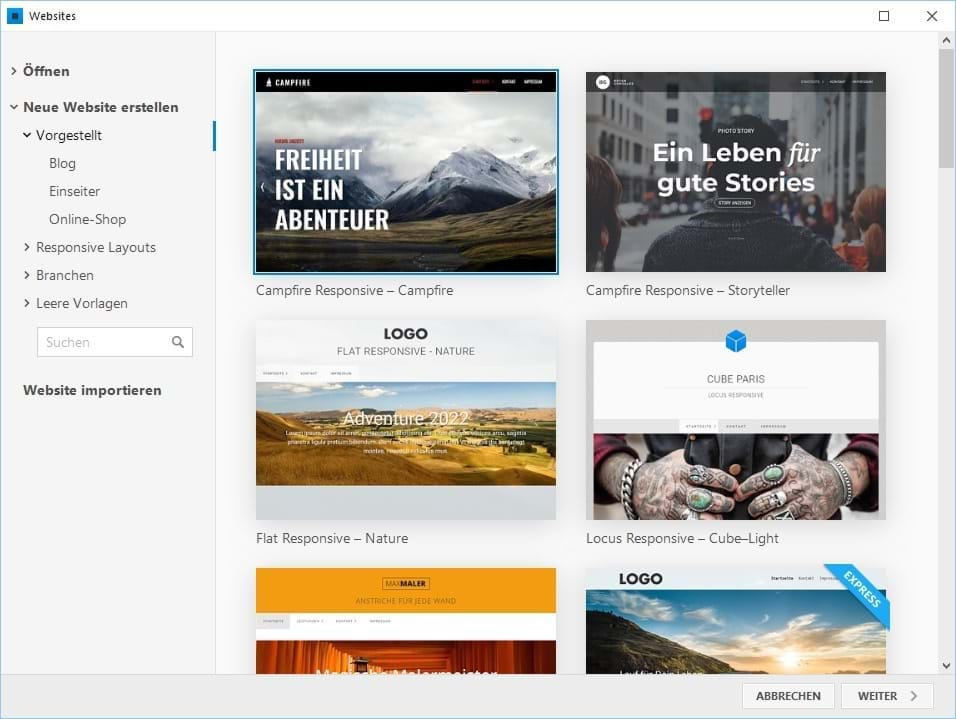
Das Design Ihrer Homepage lässt sich mit Logo, Hintergrundbildern, Farb- und Schrift-Änderungen anpassen. Sie können es auch nachträglich jederzeit anpassen oder zu einem anderen Layout wechseln.
Bereit für barrierefreie Websites
Barrierefreiheit im Web bedeutet, dass Websites für alle Menschen zugänglich und nutzbar sind, unabhängig von körperlichen oder kognitiven Einschränkungen. In vielen Fällen ist Barrierefreiheit auch gesetzlich vorgeschrieben, insbesondere für öffentliche Stellen.
Zeta Producer unterstützt Sie dabei, barrierefreie Websites zu erstellen, durch moderne technische Grundlagen und flexible Gestaltungsmöglichkeiten.

DSGVO-konforme Websites erstellen
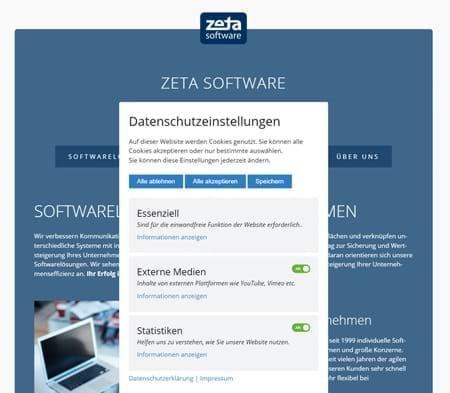
Zeta Producer bietet Ihnen alle Voraussetzungen um eine datenschutzkonforme Website zu erstellen. Unser Cookie-Consent-Widget ermöglicht Ihnen, die Besucher Ihrer Website über verwendete Cookies zu informieren und diese erst nach einer ausdrücklichen Einwilligung zu platzieren.
Die Anforderungen an den Datenschutz werden von uns regelmäßig geprüft und angepasst, damit Sie auch zukünftig eine rechtssichere Website gestalten können.
Anwender lieben Zeta Producer
Bei Zeta Producer bezahlen Sie einmal für die Programmlizenz und können dann beliebig viele Websites erstellen. Ohne zeitliche Begrenzung.
Keine Miete, kein Abo, keine laufenden Kosten – einfach und fair. Ihre komplette Website ist lokal auf Ihrem PC gespeichert und kann – falls Sie Ihre Website nicht mehr mit Zeta Producer pflegen wollen – auch mit jedem HTML-Editor bearbeitet werden.
SEO & Google Analytics
Die ansprechende Gestaltung einer Website ist wichtig, aber eine Webseite muss auch bei Google gefunden werden. Zeta Producer hilft Ihnen dabei mit cleveren Funktionen für die Suchmaschinenoptimierung.
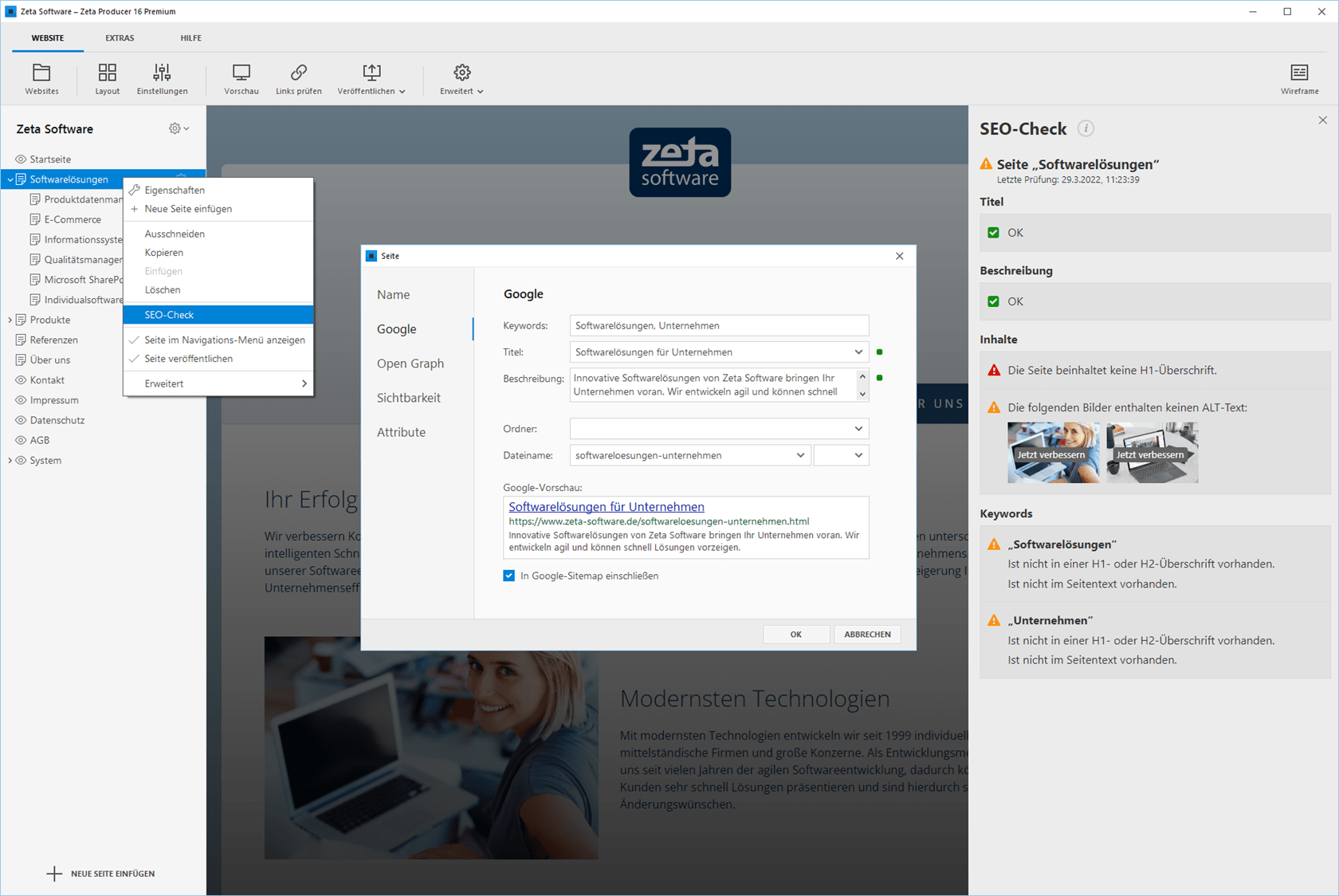
Der integrierte SEO-Check überprüft eine Seite auf die offensichtlichsten Fehler bezüglich der Suchmaschinenoptimierung. Sie können bequem auf alle relevanten Suchmaschinen-Einstellungen zugreifen und erhalten eine Vorschau Ihrer eigenen Seite in der Google-Ergebnisliste.

Auch für Google Analytics stellt Zeta Producer alles Nötige bereit: Alle Layouts haben einen Platzhalter für den nötigen Tracking-Code. Der Code muss nur einmalig in den Website-Einstellungen eingefügt werden und ist damit auf jeder Unterseite des Internetauftritts automatisch integriert.
Auf Wunsch inklusive Onlineshop
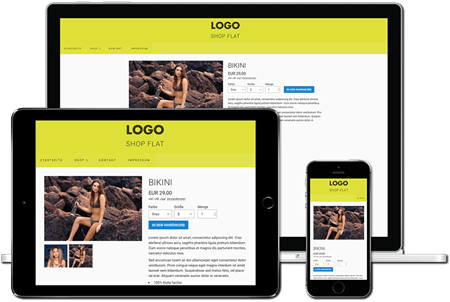
Erstellen Sie Ihren eigenen professionellen Onlineshop: Responsive Shop-Designs, attraktive Produktpräsentationen, schneller Checkout: das sind nur einige der enthaltenen Features.
Websites erstellen ohne Bindung
Bei Zeta Producer bezahlen Sie einmal für die Programmlizenz und können dann beliebig viele Websites erstellen. Ohne zeitliche Begrenzung.
Ihre komplette Website liegt lokal auf Ihrem PC und kann – falls Sie Ihre Website nicht mehr mit Zeta Producer pflegen wollen – auch mit jedem HTML-Editor bearbeitet werden.
Bei der Wahl Ihres Webspace-Anbieters haben Sie freie Hand. Zeta Producer funktioniert mit allen gängigen Anbietern wie 1&1, ALL-INKL.COM, Hetzner, Strato, domainfactory u. v. a.
Warum warten? Jetzt kostenlos testen!
Info-Service
Unser Newsletter enthält Informationen zu unseren Produkten, Angeboten, Aktionen und unserem Unternehmen. Hinweise zum Datenschutz, Widerruf sowie Erfolgsmessung und Protokollierung erhalten Sie in unserer Datenschutzerklärung.

Zeta Producer ist ein professioneller Homepage-Baukasten für Windows. Die Anwendung wird in Deutschland seit 1999 kontinuierlich weiterentwickelt und von tausenden Anwendern genutzt.
Preise
Websites für Ärzte, Handwerker, Einzelunternehmen und KMU
Ärzte-Homepage | Autohaus-Website | Beautysalon | Ferienwohnung-Homepage | Fotografen-Homepage | Friseursalon-Homepage | Handwerker-Homepage | Immobilienmakler Homepage | Kanzlei-Homepage | Nagelstudio-Homepage | Reisehomepage | Restaurant-Homepage | Steuerberater-Homepage | Vereinshomepage | Zahnarzt-Website | Noch mehr Anwendungsmöglichkeiten